Workforce Plans in Bramble help people leaders model staffing needs, understand capacity, and make informed decisions about hiring, attrition, and productivity. By connecting workload demand with available headcount, Workforce Plans provide a clear, structured way to answer a critical question:
Do we have the right number of people, at the right time, to handle the work?
This article explains how Workforce Plans are structured, what each component means, and how they support workforce and capacity planning.
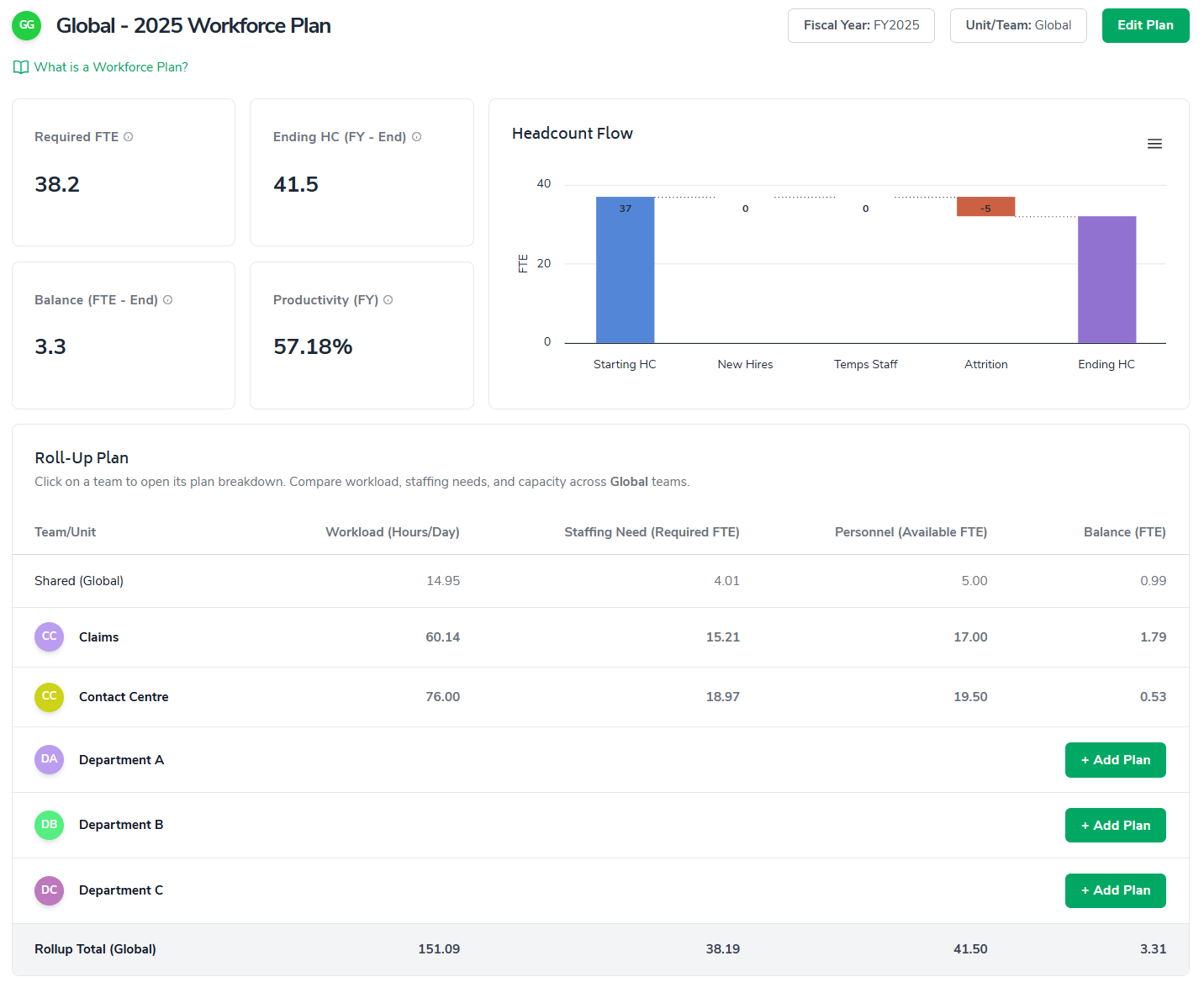
A Workforce Plan is a forward-looking model that translates operational demand (workload) into staffing requirements (FTE) and compares those requirements against available personnel.
Workforce Plans allow you to:
Forecast staffing needs over a fiscal year
Model changes in workload, productivity, and time off
Understand surplus or shortage of capacity
Align hiring and attrition plans with real demand
Roll up multiple teams into a single, global view
Plans can be created at the team, department, or global level and automatically roll up to provide leadership with a complete picture.
The Workforce Plan dashboard gives a high-level summary of staffing health and capacity.
Required FTE
Represents how many full-time equivalent employees are needed to meet the modeled workload, based on productivity and available working time.
Ending Headcount
Shows the projected number of employees available at the end of the planning period after accounting for hiring and attrition.
Balance (FTE)
Compares required FTE to available headcount.
A positive balance indicates excess capacity
A negative balance indicates a staffing shortfall
Productivity
Represents the percentage of available time that is assumed to be spent on productive work. Productivity directly impacts how much work each FTE can handle.
Together, these metrics give leaders a fast way to understand whether teams are overstaffed, understaffed, or appropriately resourced.
The Headcount Flow visual explains how headcount changes over time.
It typically includes:
Starting headcount at the beginning of the period
Planned new hires
Temporary or contract staffing changes
Expected attrition
Ending headcount
This view helps leaders understand why headcount changes, not just what the final number is. It is especially useful for explaining staffing plans to finance or executive stakeholders.
The Roll-Up Plan aggregates Workforce Plans across multiple teams or departments into a single view.
For each team, the roll-up shows:
Modeled workload
Required staffing (FTE)
Available personnel (FTE)
Resulting capacity balance
This allows leaders to:
Compare capacity across teams
Identify where excess capacity exists
Spot teams that may require hiring or rebalancing
Understand how local plans affect the global workforce picture
Teams without an active plan can be added directly from the roll-up view.
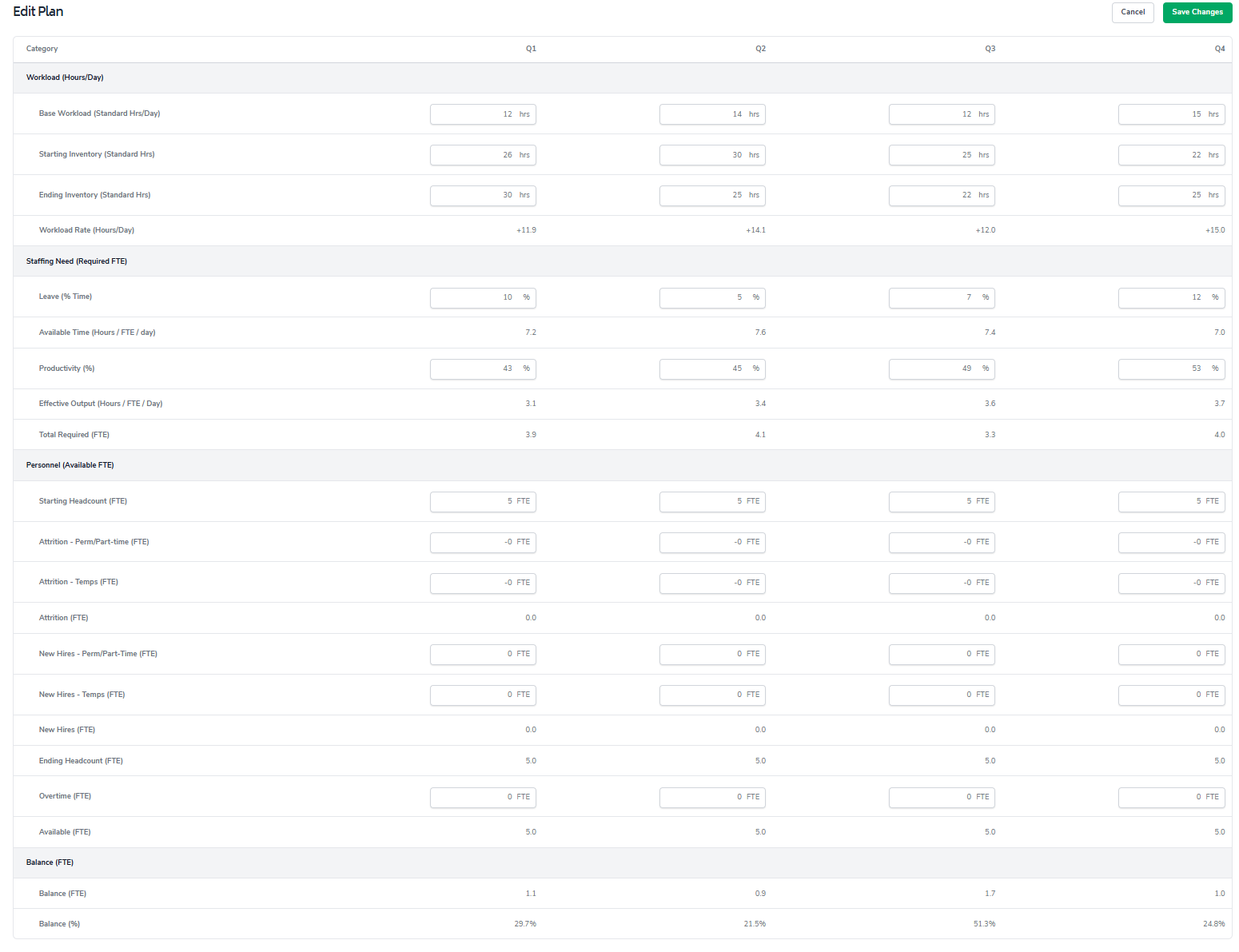
Workforce Plans are edited by quarter, allowing leaders to model changes throughout the year.
Workload represents the amount of work entering the system over time.
Key concepts include:
Base workload: Ongoing daily work
Starting inventory: Work already in progress at the beginning of a period
Ending inventory: Work expected to remain at the end of a period
Bramble uses these inputs to calculate the effective workload rate that staffing must support.
Staffing Need converts workload into required headcount.
This calculation considers:
Leave assumptions: Time unavailable due to vacation, holidays, or other absence
Available working time per FTE
Productivity assumptions
Effective output per FTE
These inputs determine how many FTEs are required to handle the modeled workload.
This section models the supply side of staffing.
It includes:
Starting headcount
Attrition for permanent and temporary staff
Planned new hires
Overtime or additional capacity
Ending headcount
Available FTE represents the actual capacity the team has to do work during the period.
Balance shows the difference between required FTE and available FTE.
A positive balance indicates extra capacity
A negative balance indicates unmet demand and potential risk
Balance can be viewed as both an absolute FTE number and a percentage, helping leaders quickly assess severity and prioritize action.
Workforce Plans support better decisions by making capacity transparent and measurable.
Leaders can use Workforce Plans to:
Justify hiring requests with data
Anticipate capacity gaps before they impact service levels
Understand the impact of productivity changes
Evaluate tradeoffs between hiring, overtime, and backlog
Align operational plans with financial forecasts
Because plans roll up automatically, leaders gain visibility across teams without needing manual spreadsheets or disconnected models.
Review and update plans regularly as workload and staffing assumptions change
Collaborate with team leads to ensure inputs reflect reality
Use balance trends to plan hiring ahead of demand
Treat productivity as a planning lever, not a fixed assumption
Use roll-ups to identify opportunities for cross-team rebalancing
Workforce Plans in Bramble provide a structured, flexible way to connect demand, capacity, and staffing decisions. By modeling how work flows through teams and how people contribute to that work, leaders gain clarity, confidence, and control over workforce planning at both the team and organizational level.