Planning Accuracy shows how closely your ‘planned week’ lined up with what actually occurred.
It's a quick way to gauge how good you are getting at predicting the future…well at least how well you are planning for the upcoming week in Bramble!
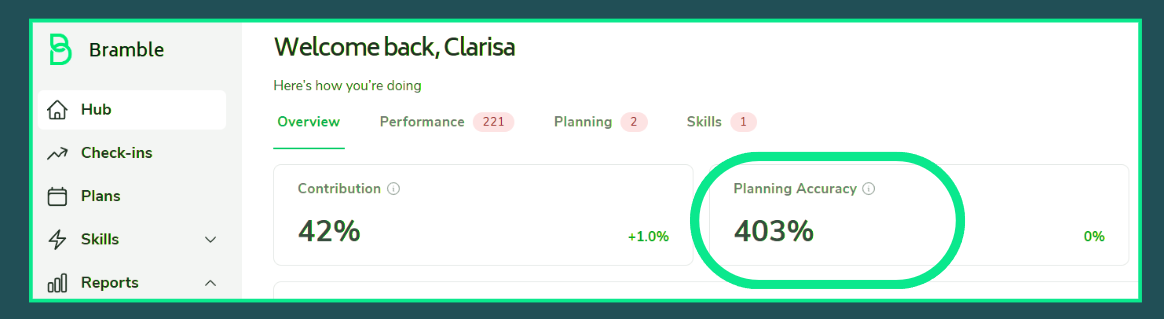
Source: An Individual Contributors’ Hub in Bramble: Clarisa may want to adjust her plan going forward- 0% Planning Accuracy means your actual results perfectly matched the planned results.
For each team member/team, Bramble looks at five metrics and compares what you/your team planned for them against what actually resulted:
Available Time (hours) — time at work
Leave hours — time off (holiday, sick, etc.)
Output (hours) — the total hours of Production Tasks completed/planned to be completed
Supporting hours — time spent on internal or non-production work
Contribution — the share of your working time that went into output work
For each of the five items above, Bramble asks:
"How far off was the actual from the plan?"
Bramble then take the average of those five differences.
That average is your Planning Accuracy score.
Let’s say your team plan was for 40 hours of Output, but the team actually completed 44 hours. The difference for this specific metric (plan v actual) is:
Difference = (44 − 40) ÷ 40 = +10%
If the difference for the other four items came out at 0%, +5%, −5% and 0%, your Planning Accuracy would be the average:
Planning Variance = (10 + 0 + 5 − 5 + 0) ÷ 5 = +2%
The result is shown as a percentage, and the sign matters:
0% — spot on, your plan matched reality
A positive number (e.g. +15%) — you did more than you planned
A negative number (e.g. −10%) — you did less than you planned
The closer to 0%, the more accurate your planning was.
Some points to remember:
If you planned nothing for an item and did nothing, that counts as a perfect match (0%).
If you planned nothing but did some, it counts as 100% over.
If you planned some but did none, it counts as 100% under.
Each of the five items carries equal weight, regardless of how many hours were involved.
The score covers the date range selected on your Hub (this week by default).